Your Phone’s Contact App is Failing You
Table of Contents

You meet someone at a party, bar, networking event, concert, festival, or just randomly out and about. They could be a potential client, friend, or romantic interest. You add them to your phone’s Contacts app, only to forget who they are a short while later, or have difficulty finding them again because you have 50 people saved with the same first name.
Broken Recall Systems
Perhaps you use your phone’s notes, emojis✌️, or add a detail about them in one of the name fields. Maybe you go the extra mile and create a system or spreadsheet to track people with more detail. But these methods often fall short at critical moments when you need to quickly recall a name or detail about someone.
It’s Time for Something Better
We’ve all been there. There are hundreds of people that we don’t remember living rent free in our address books, making the people we actually care about difficult to find. Dextr aims to solve this problem. Not only does Dextr help you remember important details about a person, but it also helps you declutter your contacts in an easy and intuitive way.
Below, we’ll cover how Dextr is a superior way to manage your contacts while cleaning up your address book at the same time.
Saving New Contacts, Optimized
Saving new contacts can be a real pain with the standard Contacts app. Whether you just want to jot down a name or enter as much detail as possible, Dextr makes it much easier.
Just like your phone, you have two ways to save a new contact in Dextr.
- You can create a new contact and then enter the details, or..
- Use Dextr’s built in keyboard to capture the number first and then enter contact details. The app even allows you to save the contact and immediately to send your name as a text in a single tap!

Non-Destructive Contact Sync
A common question we get is, “Does Dextr change anything in my phone’s Contacts app?”
The short answer is no. The app does not remove anything from your built in Contacts app or your iCloud account without your explicit permission.
With Bi-Directional Sync activated in Dextr, new contacts entered within Dextr sync to your phone’s Contacts app, which in turn syncs with your iCloud account. Contacts entered in your phone’s Contacts app are also automatically synced to Dextr. This ensures that you never lose a contact, whether it was first entered in Dextr or your phone.
Archiving Contacts
Rather than deleting contacts that you don’t remember or will never contact again, Dextr allows you to archive contacts within the app. This lets you move people out of your main contacts without losing them.
Archiving contacts in Dextr does not remove them from your phone’s Contacts app. However, coming soon, we’ll launch a feature that enables you to delete unwanted contacts from both Dextr and your phone. This feature will also allow you to save deleted contacts in a VCF file as a backup in case you ever want to restore them.

Relationships
At the core of Dextr is defining the relationships you have with people and the relationships they have with each other.
Set Your Relationships
Within Dextr, you can set one primary relationship your have per contact, such as “Friend,” “Dated,” or “Client.” You can use the built in relationship types or create your own.
For each relationship, you can also define closeness. For example, a “Husband” or “Wife” might be marked as very close, while a “Service Provider,” such as a house cleaner or landscaper, may be marked as distant. The “closeness” of your connections is used to enrich your Network Map (covered below).
Setting Relationships Between Contacts
Relationships in Dextr are, well, automatics relational. This mean that when you define a relationship between two contacts, the corresponding relationship is automatically applied to both people.
For example, if you set someone as a “Spouse” of another contact, Dextr applies the spousal relationship to the other person.
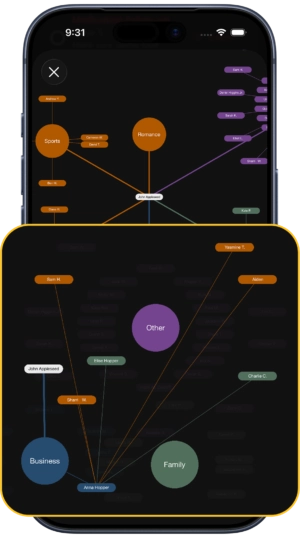
Dextr Network Map
The more relationships you define, the richer your Network Map becomes. Think of Dextr’s Network Map as a visual representation of your social life, similar to a family tree.
You can see who you are connected to and how your contacts are connected to each other. The Network Map is not only a fun way to explore connections, but also a powerful way to track down someone you are searching for.
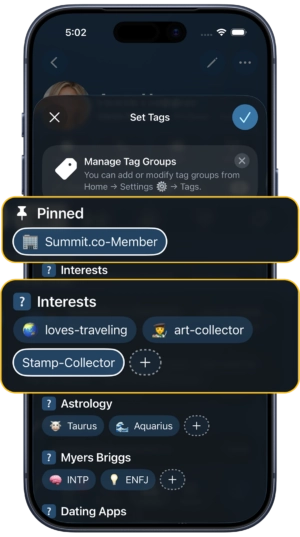
Tags
Dextr also includes a powerful tagging system. Unlike relationships where only one relationship applied, you can assign multiple tags to a person.
Tags can represent interests, personality traits, where you met, the dating app you connected through, shared groups, or any other attribute you want to track. Tags give you total flexibility to label contacts in a way that makes sense for you.
Profiles and Tags
Within each contact profile, you can assign tags in just a few taps. You can even create a new tag directly from the tagging screen.
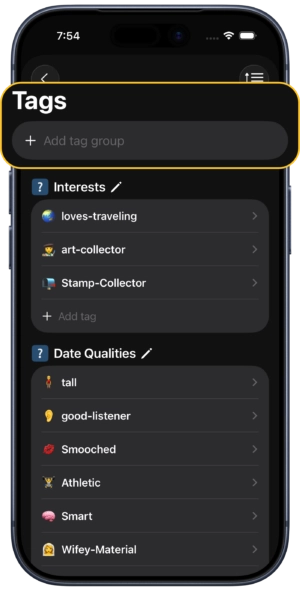
Grouping Tags and Relationships
For cleaner organization, tags and relationships can be organized into Groups under the Settings page.
For example, if you promote events, you might create relationship groups like “Venue Owners,” “Event Staff,” and “Past Attendees.” From there, you can create more specific modifiers with tags for event types such as “EDM,” “Networking,” or “Dating Events.” This way, you have an easy way to pull up groups of people who share similar interests.
Communication at Scale
A powerful feature of Dextr is the ability to send text blasts to contacts under specific Tags, Relationships, Groups, past Events, or even people you have marked as Favorites.
With Text Blasts, you can write a single message and send it to multiple people at once. Simply install the Dextr Mass Text Shortcut from the Settings page to streamline your communication.
Unlike group texts, text blasts are sent as individual messages. That means no group thread chaos and no muted conversations that get buried.
You can even add the Dextr Mass Text Shortcut to your home screen and enable it to work with Siri for faster communication when time is of the essence.

Events, Parties, and More
If you attend or host events, Dextr makes it easy to link contacts to them for easy recall at a later date.
Simply create an event in Dextr and attach the contacts you met to the event. Events can range from formal productions to birthday parties or a casual night out.
When contacts are linked to an event, Dextr saves the date you met them, which connects to next feature we’ll cover below.

First Met
Remembering when and how you first met someone can be crucial.
Within each contact profile, you can track when and where you first met someone. This can be as simple as selecting the year you met or as detailed as entering the exact date and location.
Additionally, when you create an event and link a contact to it, Dextr automatically records it as the First Met connection date, time, and location in the contact’s profile.

Interaction Tracking
Whether you want to take notes for a customer support call that you might need to reference later, or you want to keep track of details from a meeting, Dextr allows you to save interaction notes for each contact.
Notes are saved by date and contact method, making it easy to recall your last conversation.
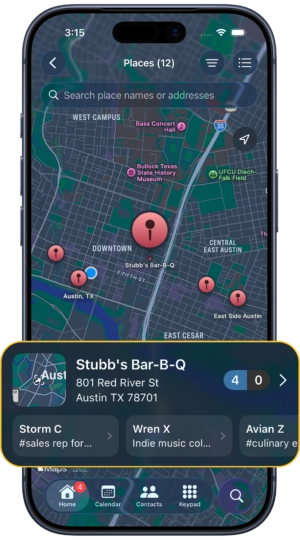
Contact Places
Where you met someone can be just as important as who you met.
Each time you associate a contact with a place, Dextr creates a record of everyone you’ve met there. This allows you to find someone by simply remembering the location, and you can view the place to see everyone you’ve ever associated with it.
Places can include businesses, cities, countries, or specific addresses. You can also keep track of a contact’s history of places, such as hometowns, past addresses, or workplaces.
Place Maps
Dextr’s Place Map view shows pins for all associated places in your contacts. It’s both a fun and practical way to visualize where your relationships began.

Powerful Address Book Search
What good is an advanced contact management app without a powerful search to match?
Everything you enter in Dextr is searchable. You can search by tags, relationships, job titles, companies, events, notes, places, dates, and more.
You can even chain multiple search filters together to narrow results with precision.
Contact Reminders
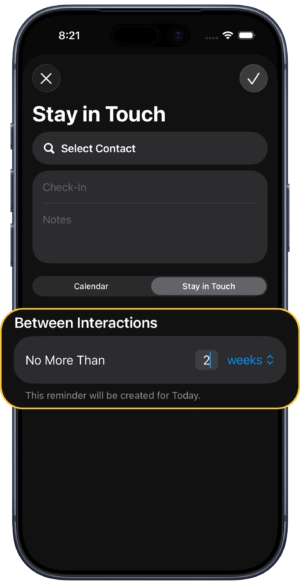
Dextr helps you stay connected with the people who matter most by offering two types of reminders.
Interval Reminders
Want to stay in touch based on the last time you spoke?
Set an interval reminder and Dextr will track your outreach. For example, if you want to text your college sibling every two weeks to check in with them, Dextr resets the timer each time you initiate a call, send a text, or log an interaction within the Dextr app.
Calendar Reminders
You can also set single reminders for a specific date and time.
Once you complete the outreach using Dextr, the reminder can automatically close, or you can chose to close it manually.
Dextr AI Organize Assistant
Managing contacts should not feel like a chore.
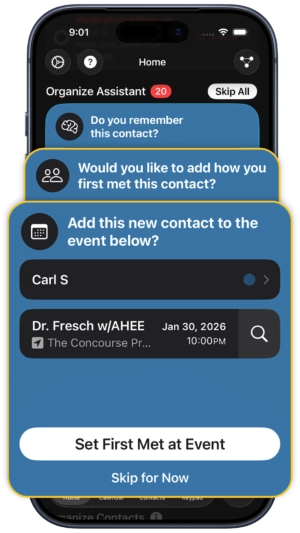
Dextr’s AI Organize Assistant helps you archive contacts and add important details through simple questions you can answer at your own pace. It prioritizes your newest contacts so you can add details while they are still fresh.
You can skip individual questions or choose “Skip All” to close it for the current session. Soon, you will also have the option to permanently disable it, with the ability to reactivate it later in Settings.
Bulk Editing
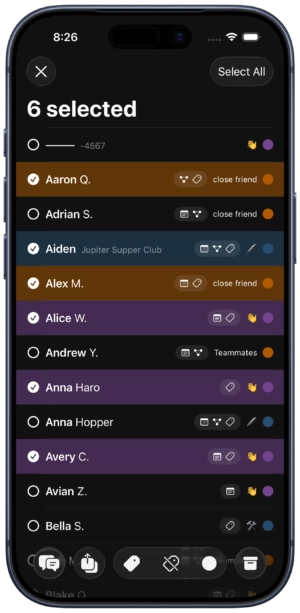
To speed up contact cleanup, Dextr allows you to bulk select contacts and perform actions on multiple people at once.
From the Contacts page, or within a Tag or Relationship collections, tap the Bulk Select icon in the upper left to select multiple contacts and apply changes efficiently.

Data, Privacy, and Backups
Your data stays yours. Simple as that.
Dextr never shares or sells your data. All information remains on your device, with backups stored in your own iCloud account.
Dextr does not download your contacts or personal data to company servers. In fact, we do not maintain servers to store that kind of information.
If you ever decide to stop using Dextr, you can easily delete the Dextr backup file from your iCloud account.

Customer Support and Final Thoughts
Modern social lives demand a better way to manage relationships.
We built Dextr to solve that problem. We are always improving, and we value your feedback. If you have questions, feature requests, or suggestions, we want to hear from you. Please don’t hesitate to reach out through our support channels. We will respond as quickly as humanly possible.
Thank you for considering Dextr! We look forward to delivering the best contact management experience possible.